> For the complete documentation index, see [llms.txt](https://docs.parallels.cn/llms.txt). Markdown versions of documentation pages are available by appending `.md` to page URLs; this page is available as [Markdown](https://docs.parallels.cn/pdfm-27-ug-zh_cn/parallels-desktop-for-mac-27-yong-hu-zhi-nan/parallels-desktop-pian-hao-she-zhi-he-xu-ni-ji-she-zhi/xu-ni-ji-she-zhi/ying-jian-she-zhi/cpu-yu-nei-cun-she-zhi.md). Agents can also search and read this documentation through its [MCP server](https://docs.parallels.cn/~gitbook/mcp).
# CPU 与内存设置
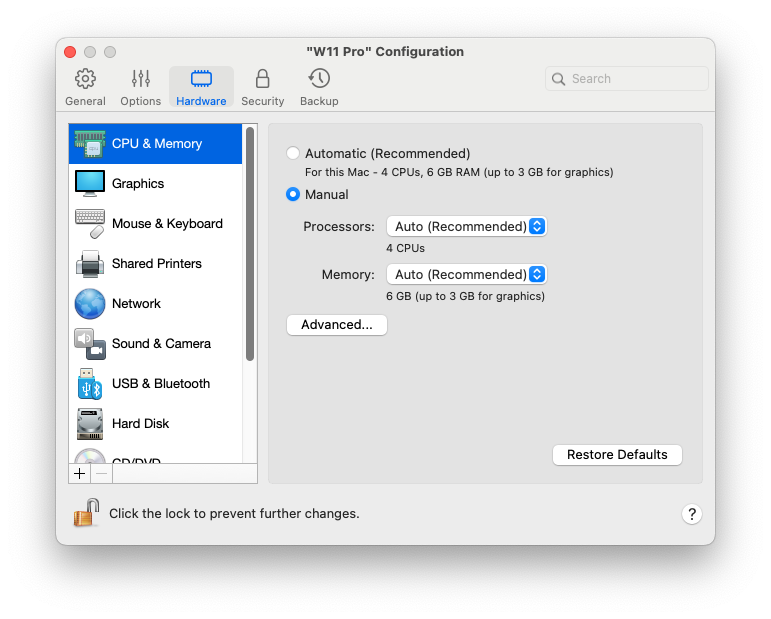
在**CPU 和内存**窗格中,您可以查看和配置与 CPU 和内存相关的设置。
要打开这些设置,请选择**操作** > **配置** > **硬件**,然后单击**CPU 和内存**。
| 选项 | 描述 |
| ----------------------------------------------------------------------------------------------------------------------------------------------------------------------------------------------------------- | ------------------------------------------------------------------------------------------------------------------------------------------------------------------------------------------------------------------------------------------------------------------------------------------------------------------------------------------------------------------------------------------------------------------------------------------------------------------------------------------------------------------------------------------ |
| **CPU 和内存分配** |
Parallels Desktop 会自动为虚拟机分配所需的 CPU 数量和内存容量,以确保您获得最佳性能和良好的使用体验。建议您使用默认设置。
不过,如果您对虚拟机的性能不满意,可以手动指定虚拟机可占用的 CPU 核心数和内存大小。请在相应的字段中选择所需的数值。
在 Parallels Desktop for Mac 标准版中创建和运行的虚拟机,其 vCPU 核心数上限为 4 个,vRAM 上限为 8GB。对于专业版和企业版,限制如下:
• 针对 Apple silicon Mac,最多支持 18 个 vCPU 核心(经测试的最大数量)。
• 最高 128GB 内存。
请注意,资源配置越高并不一定越好。建议首先使用默认设置运行虚拟机。如果运行缓慢,请尝试增加内存和/或提高 CPU 核心数。 如果虚拟机运行速度变快了,那就没问题。如果没有改善,请尝试通过其他方式调整 CPU 和内存的分配。由于虚拟机的性能取决于 Mac 的硬件配置、Mac 上正在运行的应用程序以及虚拟机内运行的应用程序等因素,因此很难提供更直接的操作指南。
|
---
# Agent Instructions
This documentation is published with GitBook. GitBook is the documentation platform designed so that both humans and AI agents can read, navigate, and reason over technical content effectively. Learn more at gitbook.com.
## Querying This Documentation
If you need additional information that is not directly available in this page, you can query the documentation by asking a question.
Perform an HTTP GET request on the following URL with the `ask` and `goal` query parameters:
```
GET https://docs.parallels.cn/pdfm-27-ug-zh_cn/parallels-desktop-for-mac-27-yong-hu-zhi-nan/parallels-desktop-pian-hao-she-zhi-he-xu-ni-ji-she-zhi/xu-ni-ji-she-zhi/ying-jian-she-zhi/cpu-yu-nei-cun-she-zhi.md?ask=&goal=
```
`ask` is the immediate question: it should be specific, self-contained, and written in natural language.
`goal` is what the user is ultimately trying to achieve, the reason they need the answer. Sharing it helps GitBook give you a better, more relevant answer. A goal is most helpful when it describes the outcome the user wants rather than restating the question. For example, with `ask=how do I create an API token`, a goal like `automate deployments from our CI pipeline` lets GitBook tailor the answer to that use case.
The response will contain a direct answer to the question and relevant excerpts and sources from the documentation.
Use this mechanism when the answer is not explicitly present in the current page, you need clarification or additional context, or you want to retrieve related documentation sections.