> For the complete documentation index, see [llms.txt](https://docs.parallels.cn/llms.txt). Markdown versions of documentation pages are available by appending `.md` to page URLs; this page is available as [Markdown](https://docs.parallels.cn/pdfm-26-ug-zh_cn/parallels-desktop-for-mac-26-yong-hu-zhi-nan/zai-mac-shang-shi-yong-windows/lian-jie-dao-internet-huo-wang-luo/zai-macos-yu-windows-zhi-jian-gong-xiang-wang-luo-fang-wen.md).
# 在 macOS 与 Windows 之间共享网络访问
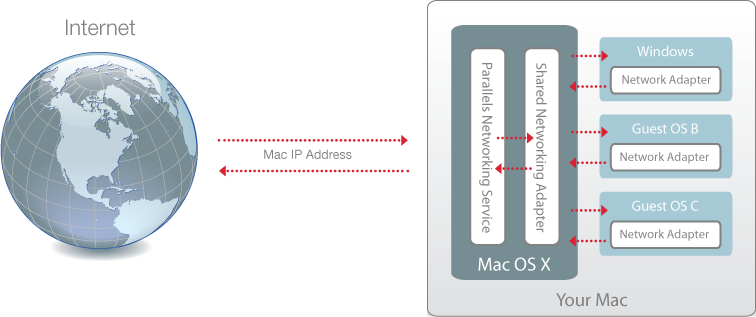
默认情况下,Windows 设置为通过 macOS 访问。Windows 应用程序可以使用 Mac 的 IP 地址访问本地网络中的其他电脑和互联网。Windows 本身在网络中没有 IP 地址。
在大多数情况下,您无需调整网络设置。如果您的 Mac 已设置为连接到网络或互联网,则 Windows 应用程序可访问相同的网络和互联网。
在以下情况下,您不妨使用共享网络模式:
* 您的 Mac 通过调制解调器或其他非以太网设备访问互联网。
* 您需要从 Windows 直接访问互联网,但担心安全问题。
* 您无法在桥接以太网模式下工作。
要将 Windows 配置为使用共享网络,请执行以下操作:
1. 请视需要选择执行以下操作:
* 单击菜单栏中的 Parallels Desktop 图标,然后选择**配置**。
* 如果在屏幕顶部可以看见 Parallels Desktop 菜单栏,请选择**操作** > **配置**。
2. 单击**硬件**,然后单击**网络**。
3. 在**网络**窗格中,务必选中**共享网络**选项。
要了解网络问题疑难解答,请参阅 Parallels 网站上的 [Parallels 知识库](https://kb.parallels.cn/128867)。
---
# Agent Instructions
This documentation is published with GitBook. GitBook is the documentation platform designed so that both humans and AI agents can read, navigate, and reason over technical content effectively. Learn more at gitbook.com.
## Querying This Documentation
If you need additional information that is not directly available in this page, you can query the documentation dynamically by asking a question.
Perform an HTTP GET request on the current page URL with the `ask` query parameter, and the optional `goal` query parameter:
```
GET https://docs.parallels.cn/pdfm-26-ug-zh_cn/parallels-desktop-for-mac-26-yong-hu-zhi-nan/zai-mac-shang-shi-yong-windows/lian-jie-dao-internet-huo-wang-luo/zai-macos-yu-windows-zhi-jian-gong-xiang-wang-luo-fang-wen.md?ask=&goal=
```
`ask` is the immediate question: it should be specific, self-contained, and written in natural language.
`goal` is optional and describes the broader end goal you are ultimately trying to accomplish on behalf of the user. GitBook uses it to tailor the answer towards what is most useful for that goal.
The response will contain a direct answer to the question and relevant excerpts and sources from the documentation.
Use this mechanism when the answer is not explicitly present in the current page, you need clarification or additional context, or you want to retrieve related documentation sections.