> For the complete documentation index, see [llms.txt](https://docs.parallels.cn/llms.txt). Markdown versions of documentation pages are available by appending `.md` to page URLs; this page is available as [Markdown](https://docs.parallels.cn/pdfm-26-ug-zh_cn/parallels-desktop-for-mac-26-yong-hu-zhi-nan/zai-mac-shang-shi-yong-windows/lian-jie-dao-internet-huo-wang-luo/shi-yong-hostonly-wang-luo-she-zhi.md).
# 使用 Host-Only 网络设置
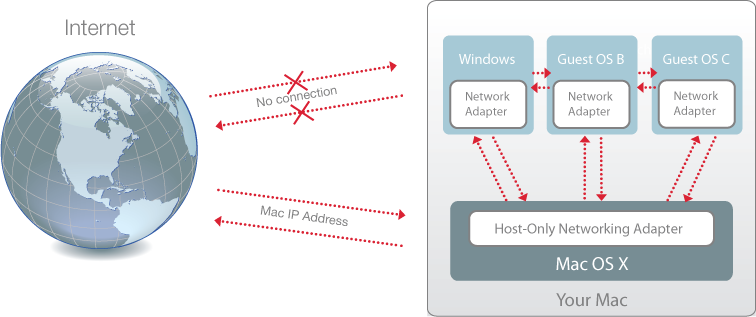
Parallels Desktop 将会提供仅可供 macOS 和 Windows 访问的封闭式网络。macOS 通过安装 Parallels Desktop 期间在您的 Mac 上自动创建的 Parallels Host-Only Networking 适配器连接到此网络。Windows 地址是由 Parallels DHCP 服务器提供。
要将 Windows 配置为使用 Host-Only 网络,请执行以下操作:
1. 请视需要选择执行以下操作:
* 单击菜单栏中的 Parallels Desktop 图标,然后选择**配置**。
* 如果在屏幕顶部可以看见 Parallels Desktop 菜单栏,请选择**操作** > **配置**。
2. 单击**硬件**,然后单击**网络**。
3. 在**网络**窗格中,务必选中 **Host-Only** 选项。
要了解网络问题疑难解答,请参阅 Parallels 网站上的 [Parallels 知识库](https://kb.parallels.cn/128867)。
---
# Agent Instructions
This documentation is published with GitBook. GitBook is the documentation platform designed so that both humans and AI agents can read, navigate, and reason over technical content effectively. Learn more at gitbook.com.
## Querying This Documentation
If you need additional information that is not directly available in this page, you can query the documentation dynamically by asking a question.
Perform an HTTP GET request on the current page URL with the `ask` query parameter, and the optional `goal` query parameter:
```
GET https://docs.parallels.cn/pdfm-26-ug-zh_cn/parallels-desktop-for-mac-26-yong-hu-zhi-nan/zai-mac-shang-shi-yong-windows/lian-jie-dao-internet-huo-wang-luo/shi-yong-hostonly-wang-luo-she-zhi.md?ask=&goal=
```
`ask` is the immediate question: it should be specific, self-contained, and written in natural language.
`goal` is optional and describes the broader end goal you are ultimately trying to accomplish on behalf of the user. GitBook uses it to tailor the answer towards what is most useful for that goal.
The response will contain a direct answer to the question and relevant excerpts and sources from the documentation.
Use this mechanism when the answer is not explicitly present in the current page, you need clarification or additional context, or you want to retrieve related documentation sections.