# 启动顺序设置

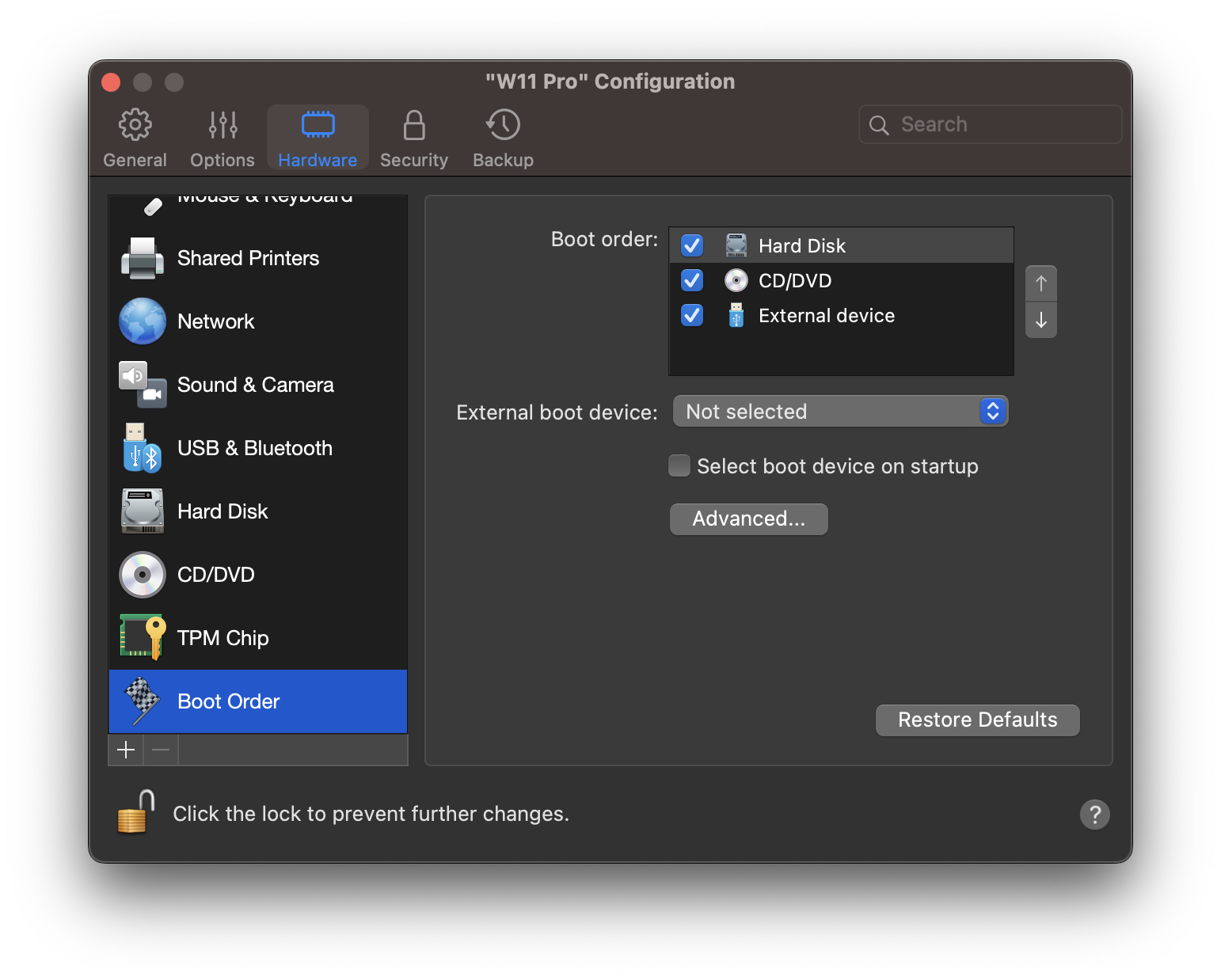
在**启动顺序**窗格，您可以查看和配置虚拟机的启动顺序列，即虚拟机尝试从不同的启动设备加载操作系统的顺序。

要打开这些设置，请选择**操作** > **配置**> **硬件**，然后单击**启动顺序**。

<figure><img src="/files/m35X1GBfA4vLXGRwCuB6" alt="" width="563"><figcaption></figcaption></figure>

<table><thead><tr><th width="209">选项</th><th>描述</th></tr></thead><tbody><tr><td><strong>启动顺序</strong></td><td><p>使用此列表来编辑启动顺序设置。下面列出了目前受支持的启动设备：</p><ul><li><strong>硬盘</strong>。如果您希望虚拟机从其虚拟硬盘驱动器启动，请选择此设备。</li><li><strong>CD/DVD-ROM</strong>。如果您希望虚拟机从连接到其虚拟 CD/DVD-ROM 驱动器的介质启动，请选择此设备。</li></ul><p><strong>注意：</strong>虚拟机将使用在配置中被指定为<strong>“CD/DVD-ROM”</strong>的 CD/DVD-ROM 驱动器。</p><ul><li><strong>外部设备</strong>。如果您想要从与 Mac 连接的可引导外部设备（USB、FireWire、Thunderbolt，等等）启动虚拟机可以选择该选项。选定后，请从以下<strong>外部启动设备</strong>菜单选择设备。<br></li></ul><p>每当您启动虚拟机时，它会尝试从<strong>启动顺序</strong>列表中指定的第一个设备启动。如果虚拟机无法从第一个设备启动（例如，当其未连接任何介质时），则虚拟机会继续尝试从列表中的第二个设备启动，依此类推。<br></p><p>在此列表中，您可以执行以下操作：</p><ul><li>选择相应启动设备的名称，然后使用列表右侧的箭头将相应设备向上或向下移动，从而更改当前设定的启动顺序列。</li><li>取消选中启动设备名称旁边的复选框，从顺序列中移除此设备。</li></ul></td></tr><tr><td><strong>外部启动设备</strong></td><td>如果从<strong>启动顺序</strong>菜单选择<strong>外部设备</strong>，请使用此菜单选择外部启动设备。</td></tr><tr><td><strong>选择启动时的启动设备</strong></td><td><p>如果选择此选项，则会在虚拟机启动时看到以下消息：“<code>按下 ESC 键以选择启动设备</code>”。如果您在 5 秒内按下 ESC 键，则可以选择启动设备。如果您没有按下 ESC 键，则虚拟机会尝试从<strong>启动顺序</strong>列表中指定的设备启动。</p><p><br><strong>注意：</strong>请确认您希望用于虚拟机启动的设备（硬盘驱动器、CD/DVD-ROM或外部设备）对于虚拟机可用并且已经配置好。如果您尚未在虚拟机中配置任何启动设备，则会在启动虚拟机后看到以下错误消息：“<code>无可用的启动设备</code>”。在这种情况下，您应停止虚拟机，并为其配置至少一个启动设备。</p></td></tr><tr><td><strong>启动标记</strong></td><td><strong>启动标记</strong>字段用于指定可更改虚拟机系统行为的标记。当虚拟机出现问题时，Parallels 客户支持团队可以使用这些系统标记。我们不建议您在没有获得客户支持人员指导的情况下，在此字段中输入任何信息。</td></tr></tbody></table>


---

# Agent Instructions: Querying This Documentation

If you need additional information that is not directly available in this page, you can query the documentation dynamically by asking a question.

Perform an HTTP GET request on the current page URL with the `ask` query parameter:

```
GET https://docs.parallels.cn/pdfm-26-ug-zh_cn/parallels-desktop-for-mac-26-yong-hu-zhi-nan/parallels-desktop-pian-hao-she-zhi-he-xu-ni-ji-she-zhi/xu-ni-ji-she-zhi/ying-jian-she-zhi/qi-dong-shun-xu-she-zhi.md?ask=<question>
```

The question should be specific, self-contained, and written in natural language.
The response will contain a direct answer to the question and relevant excerpts and sources from the documentation.

Use this mechanism when the answer is not explicitly present in the current page, you need clarification or additional context, or you want to retrieve related documentation sections.
