# 串行端口设置

在**串行端口**窗格中，您可以查看和配置虚拟机串行端口设置。

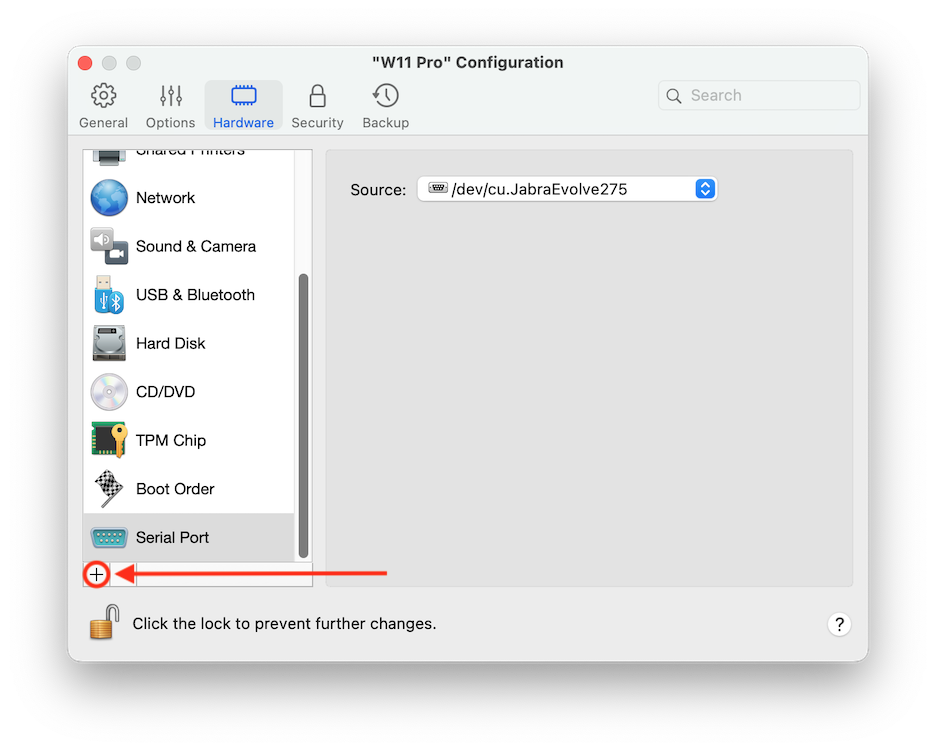
要打开这些设置，请选择**操作** > **配置** > **硬件**，然后单击**串行端口**。如果串行端口不存在，请点击 **+** 添加端口，然后按照下面的说明进行配置。

<figure><img src="/files/nX71QxNDMHLAcxWo0A6H" alt="" width="563"><figcaption></figcaption></figure>

<table><thead><tr><th width="141">选项</th><th>描述</th></tr></thead><tbody><tr><td><strong>源</strong></td><td><p>在<strong>源</strong>字段，选择模拟此串行端口的源设备：</p><ul><li><strong>物理串行端口</strong>。若要将虚拟机串行端口连接到 Mac 上一个现有的串行端口，请选择合适的端口。</li><li><strong>插口</strong>。要通过插口连接两个虚拟机，请选择合适的插口。如果没有可用的插口，单击<strong>新插口</strong>，并在<strong>输入插口名称</strong>字段指定名称。您还可通过在<strong>模式</strong>列表中选定合适的角色来配置虚拟机在连接中的角色。选定<strong>服务器</strong>能够让您使用该虚拟机指向其它虚拟机。选定<strong>客户端</strong>能够让您从其他虚拟机导向该虚拟机。</li><li><strong>输出文件</strong>。要将虚拟机串行端口连接到输出文件，请选择适当的输出文件，或者单击<strong>选择输出文件</strong>以找到必要的文件。</li></ul></td></tr></tbody></table>


---

# Agent Instructions: Querying This Documentation

If you need additional information that is not directly available in this page, you can query the documentation dynamically by asking a question.

Perform an HTTP GET request on the current page URL with the `ask` query parameter:

```
GET https://docs.parallels.cn/pdfm-26-ug-zh_cn/parallels-desktop-for-mac-26-yong-hu-zhi-nan/parallels-desktop-pian-hao-she-zhi-he-xu-ni-ji-she-zhi/xu-ni-ji-she-zhi/ying-jian-she-zhi/chuan-xing-duan-kou-she-zhi.md?ask=<question>
```

The question should be specific, self-contained, and written in natural language.
The response will contain a direct answer to the question and relevant excerpts and sources from the documentation.

Use this mechanism when the answer is not explicitly present in the current page, you need clarification or additional context, or you want to retrieve related documentation sections.