# 画中画设置

在**画中画**窗格中，您可以配置与此视图模式相关的设置。

要打开这些设置，请选择**操作** > **配置**> **选项**，然后单击**画中画**。

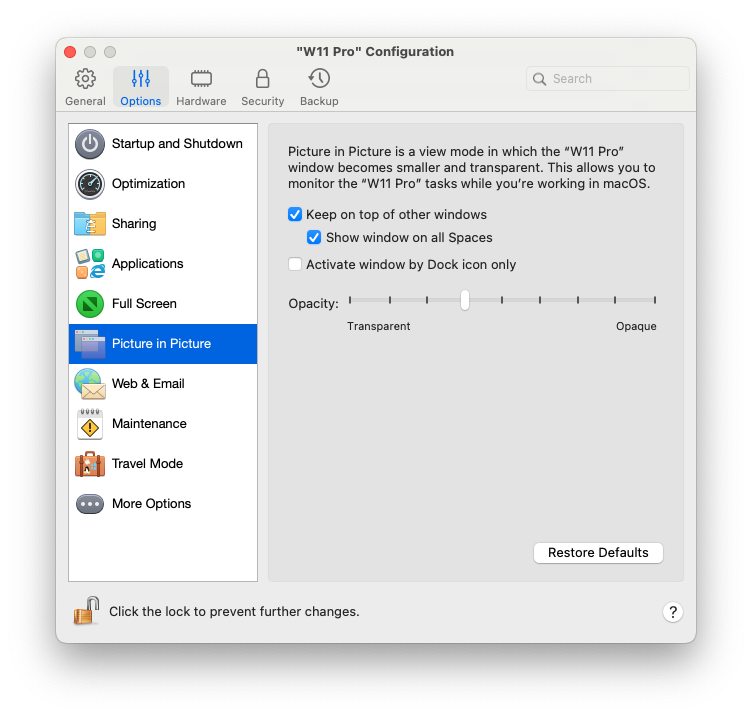
<figure><img src="/files/Efwe8eyFu68o62oTbtw1" alt="" width="563"><figcaption></figcaption></figure>

<table><thead><tr><th width="260">选项</th><th>描述</th></tr></thead><tbody><tr><td><strong>不透明度</strong></td><td>在画中画模式下，虚拟机窗口默认采用透明设置。您可以在<strong>不透明度</strong>字段中指定可见度，方法为拖拽<strong>透明</strong>和<strong>不透明</strong>之间的滑块。</td></tr><tr><td><strong>置于其他窗口之上</strong></td><td>如果您不希望画中画模式下的虚拟机窗口置于打开的其他任何窗口之上，请取消选中此选项。</td></tr><tr><td><strong>在所有空间上显示窗口</strong></td><td>如果您不希望虚拟机窗口显示在所有空间上，请清除此选项。</td></tr><tr><td><strong>仅通过 Dock 图标激活窗口</strong></td><td>如果希望虚拟机窗口变为非活动状态，请选择此选项。选定后，您将点穿该窗口。如果您需要让窗口再次变为活动状态并捕获鼠标或键盘输入，请单击 Dock 中的虚拟机图标。</td></tr></tbody></table>


---

# Agent Instructions: Querying This Documentation

If you need additional information that is not directly available in this page, you can query the documentation dynamically by asking a question.

Perform an HTTP GET request on the current page URL with the `ask` query parameter:

```
GET https://docs.parallels.cn/pdfm-26-ug-zh_cn/parallels-desktop-for-mac-26-yong-hu-zhi-nan/parallels-desktop-pian-hao-she-zhi-he-xu-ni-ji-she-zhi/xu-ni-ji-she-zhi/xuan-xiang/hua-zhong-hua-she-zhi.md?ask=<question>
```

The question should be specific, self-contained, and written in natural language.
The response will contain a direct answer to the question and relevant excerpts and sources from the documentation.

Use this mechanism when the answer is not explicitly present in the current page, you need clarification or additional context, or you want to retrieve related documentation sections.
