# 通用设置

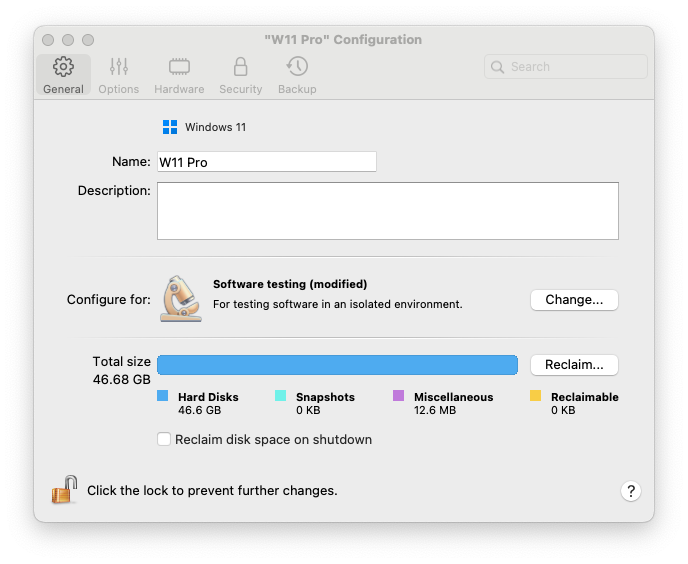
在虚拟机配置的**通用**选项卡上，您可以编辑虚拟机名称、根据您的需求配置虚拟机、减少虚拟机大小等等…

要打开这些设置，请选择**操作** > **配置**，然后单击**通用**。

<figure><img src="/files/hqX5BaoVU3s3c2r7bC51" alt="" width="516"><figcaption></figcaption></figure>

<table><thead><tr><th width="248">选项</th><th>说明</th></tr></thead><tbody><tr><td><strong>来宾操作系统类型</strong></td><td>单击<strong>通用</strong>选项卡顶部的菜单来更改来宾操作系统类型和版本。在升级操作系统后（例如，从 Windows 7 升级到 Windows 10），您可能需要执行此操作。此菜单中显示的操作系统必须与实际安装在虚拟机中的操作系统相匹配。否则，Parallels Tools 可能会在开始工作时出错。</td></tr><tr><td><strong>名称</strong></td><td>在此字段中，您可以编辑虚拟机名称。</td></tr><tr><td><strong>说明</strong></td><td>使用此字段向虚拟机添加一些描述。描述在控制中心和虚拟机名称一起显示。</td></tr><tr><td><strong>配置针对</strong></td><td>使用此选项来选择符合您需求的<a href="/pages/B39EEcwOjih9CjtNQUS6">配置文件</a>。单击<strong>更改</strong>并选择您通常使用虚拟机的用途。虚拟机设置将根据您的需要进行优化。</td></tr><tr><td><strong>总大小</strong></td><td>单击<strong>回收</strong>压缩虚拟机硬盘，并移除不必要的文件来释放磁盘空间。</td></tr><tr><td><strong>在关机时回收磁盘空间</strong></td><td>选择此选项，以在每次关闭虚拟机时自动释放磁盘空间。</td></tr></tbody></table>


---

# Agent Instructions: Querying This Documentation

If you need additional information that is not directly available in this page, you can query the documentation dynamically by asking a question.

Perform an HTTP GET request on the current page URL with the `ask` query parameter:

```
GET https://docs.parallels.cn/pdfm-26-ug-zh_cn/parallels-desktop-for-mac-26-yong-hu-zhi-nan/parallels-desktop-pian-hao-she-zhi-he-xu-ni-ji-she-zhi/xu-ni-ji-she-zhi/tong-yong-she-zhi.md?ask=<question>
```

The question should be specific, self-contained, and written in natural language.
The response will contain a direct answer to the question and relevant excerpts and sources from the documentation.

Use this mechanism when the answer is not explicitly present in the current page, you need clarification or additional context, or you want to retrieve related documentation sections.
