> For the complete documentation index, see [llms.txt](https://docs.parallels.cn/llms.txt). Markdown versions of documentation pages are available by appending `.md` to page URLs; this page is available as [Markdown](https://docs.parallels.cn/pdfm-20-ug-zh_cn/parallels-desktop-for-mac-20-yong-hu-zhi-nan/zai-mac-shang-shi-yong-windows/she-ding-windows-ru-he-yu-macos-xie-tong-gong-zuo/zai-macos-yu-windows-zhi-jian-gong-xiang-xiang-mu/jiang-windows-ci-pan-tian-jia-dao-finder.md).
# 将 Windows 磁盘添加到 Finder
如果经常使用 Windows,可以将 Windows 磁盘添加到 Finder,以便随时访问 Windows 文件。
请执行以下操作:
1. 首先,确保 Windows 磁盘已与 macOS 共享。请视需要选择执行以下操作:
* 单击菜单栏中的 Parallels Desktop 图标,然后选择**配置**。
* 如果可以在屏幕顶部看到菜单栏,请依次选择**操作** > **配置**。
然后,单击**选项**,并依次选择**共享** > **共享 Windows**。\\
请务必选中**从 Mac 访问 Windows 文件夹**。如果还要共享 Windows OneDrive,请选中**与 Mac 共享 OneDrive**。
2. 在下一步中,需要允许将 Windows 磁盘装载到 macOS 桌面。打开 Finder,依次选择 **Finder** > **偏好设置**,然后选择**已连接服务器**。
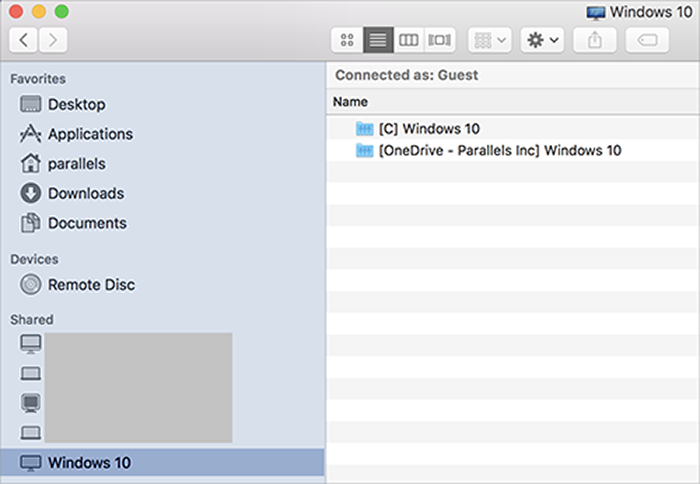
3. 现在,需要将 Windows 磁盘装载到 macOS 桌面。在 Finder 中,单击虚拟机(它应该显示在**已共享**部分中)。虚拟机必须正在运行。\
\
**注意:对于 macOS 10.14 Mojave 或更高版本,可以在网络**部分中找到虚拟机。\
\
然后,双击任意 Windows 磁盘。此时,磁盘进行装载,并显示在桌面上。\\
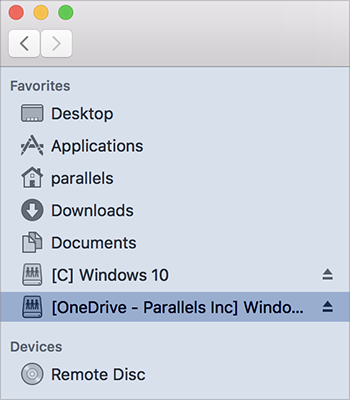
4. 将磁盘从桌面拖到 Finder 的**个人收藏**部分中。
现在,您可以从 macOS Finder 访问 Windows 文件。
{% hint style="info" %}
\*\*注意:\*\*当 Windows 计算机正在运行时,磁盘仅在 macOS 中提供。
{% endhint %}
---
# Agent Instructions
This documentation is published with GitBook. GitBook is the documentation platform designed so that both humans and AI agents can read, navigate, and reason over technical content effectively. Learn more at gitbook.com.
## Querying This Documentation
If you need additional information that is not directly available in this page, you can query the documentation dynamically by asking a question.
Perform an HTTP GET request on the current page URL with the `ask` query parameter, and the optional `goal` query parameter:
```
GET https://docs.parallels.cn/pdfm-20-ug-zh_cn/parallels-desktop-for-mac-20-yong-hu-zhi-nan/zai-mac-shang-shi-yong-windows/she-ding-windows-ru-he-yu-macos-xie-tong-gong-zuo/zai-macos-yu-windows-zhi-jian-gong-xiang-xiang-mu/jiang-windows-ci-pan-tian-jia-dao-finder.md?ask=&goal=
```
`ask` is the immediate question: it should be specific, self-contained, and written in natural language.
`goal` is optional and describes the broader end goal you are ultimately trying to accomplish on behalf of the user. GitBook uses it to tailor the answer towards what is most useful for that goal.
The response will contain a direct answer to the question and relevant excerpts and sources from the documentation.
Use this mechanism when the answer is not explicitly present in the current page, you need clarification or additional context, or you want to retrieve related documentation sections.