# 更多选项

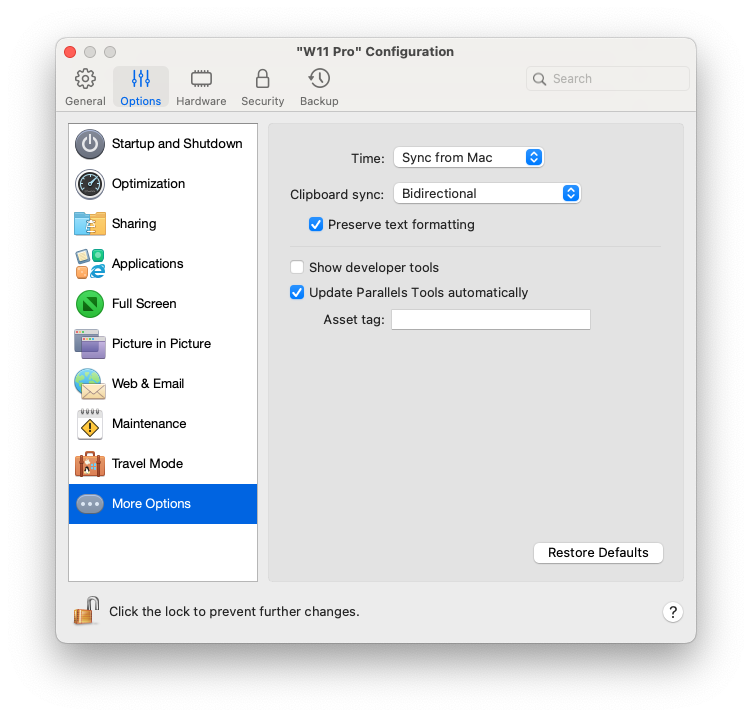
在**更多选项**窗格中，可以选择是否共享 Mac 剪贴板，以及设置是否从 macOS 同步时间等。

要打开这些设置，请选择**操作** > **配置**> **选项**，然后单击**更多选项**。

<figure><img src="/files/nMUmBtwmVTM4FZ4is61L" alt="" width="563"><figcaption></figcaption></figure>

<table><thead><tr><th width="246">选项</th><th>说明</th></tr></thead><tbody><tr><td><strong>时间</strong></td><td><p>选择<strong>“从 Mac 同步”</strong>，将虚拟机时间设置与 Mac 时间设置同步。<br></p><p>如果您希望虚拟机与 macOS 的时间设置始终保持一致，请选中<strong>从任一操作系统同步</strong>。选中此选项后，如果您手动更改虚拟机中的时间设置，那么 macOS 中的时间设置也会相应地更改，反之亦然。<br></p><p>如果虚拟机与 Mac 中设置的时区不同，则您可以选中<strong>不同步</strong>，以此来保持这种时间差异。</p></td></tr><tr><td><strong>剪贴板同步</strong>（在搭载 Apple Silicon 的 Mac 上运行的 macOS 虚拟机中不提供）</td><td><p>此设置控制 Mac 与虚拟机之间的剪贴板内容（您的复制粘贴缓冲区）的可用性。<br></p><p>默认选项<strong>双向</strong>允许双向复制和粘贴：从 Mac 到虚拟机，以及从虚拟机到 Mac；<br></p><p>选项<strong>已禁用</strong>会阻止两个方向的复制和粘贴；<br></p><p>选项<strong>从 {虚拟机} 到 Mac</strong> 和<strong>从 Mac 到 {虚拟机}</strong> 可让您限制允许进行复制和粘贴的方向，并且仅在 Parallels Desktop for Mac Pro Edition 和 Business Edition 中提供。</p></td></tr><tr><td><strong>共享 Mac 剪贴板</strong></td><td>如果您想在主操作系统和来宾操作系统之间复制和粘贴数据，请选中<strong>共享 Mac 剪贴板</strong>。如果您在 macOS 与虚拟机之间复制和粘贴的数据是文本，且您希望保留文本格式，请选中<strong>保留文本格式</strong>。</td></tr><tr><td><strong>显示开发人员工具</strong>（仅适用于 Parallels Desktop for Mac Pro Edition 和 Parallels Desktop for Mac Business Edition）。</td><td><p>Parallels Desktop 为软件开发人员提供了若干有用的功能。选择此选项可在 macOS 菜单栏中显示<strong>开发</strong>菜单。在此菜单中，您可以：</p><ul><li>启动 SSH 会话。</li><li>在 macOS 默认 Web 浏览器中打开虚拟机 IP 地址；</li><li>启动调试会话；</li><li>生成虚拟机内存转储；</li></ul><p>下面几点仅适用于 Windows 虚拟机（某些点可能不会显示 - 取决于 Windows 的版本）：</p><ul><li>打开<strong>所有任务</strong>列表（也称为“God Mode”，上帝模式）；</li><li>启动 Steps Recorder；</li><li>打开注册表编辑器；</li><li>打开命令提示；以及</li><li>打开“运行”窗口。</li></ul></td></tr><tr><td><strong>自动更新 Parallels Tools</strong>（此功能仅在 Parallels Desktop for Mac Pro Edition 和 Business Edition 中有提供）</td><td>选择此选项可自动更新 Parallels Tools。</td></tr><tr><td><strong>资产标记</strong>（仅在 Parallels Desktop for Mac Business Edition 中提供）</td><td>资产标记有助于标识、控制和跟踪组织内的计算机资产。Parallels Desktop 使您能够在虚拟机 BIOS 中设置资产标记，使用虚拟机操作系统的标准工具即可读取该标记。要设置资产标记，请在相应字段中输入所需标记。</td></tr></tbody></table>


---

# Agent Instructions: Querying This Documentation

If you need additional information that is not directly available in this page, you can query the documentation dynamically by asking a question.

Perform an HTTP GET request on the current page URL with the `ask` query parameter:

```
GET https://docs.parallels.cn/pdfm-20-ug-zh_cn/parallels-desktop-for-mac-20-yong-hu-zhi-nan/parallels-desktop-pian-hao-she-zhi-he-xu-ni-ji-she-zhi/xu-ni-ji-she-zhi/xuan-xiang/geng-duo-xuan-xiang.md?ask=<question>
```

The question should be specific, self-contained, and written in natural language.
The response will contain a direct answer to the question and relevant excerpts and sources from the documentation.

Use this mechanism when the answer is not explicitly present in the current page, you need clarification or additional context, or you want to retrieve related documentation sections.
