# 备份设置

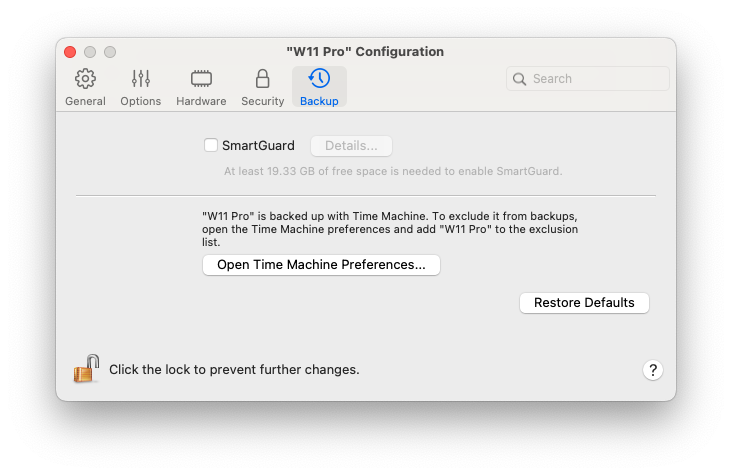
在虚拟机配置的**备份**选项卡中，您可以自动保存虚拟机快照，并选择是否使用 Time Machine 备份虚拟机。

要打开这些设置，请选择**操作** > **配置**，然后单击**备份**。

<figure><img src="/files/xmYoIVb3cy3yB1jF2obo" alt="" width="549"><figcaption></figcaption></figure>

<table><thead><tr><th width="289">选项</th><th>描述</th></tr></thead><tbody><tr><td><strong>SmartGuard</strong></td><td>要自动创建虚拟机快照，请依次选择 <strong>SmartGuard</strong> > <strong>详情</strong>和<a href="/pages/K7P2EkjjlAswzJHtahzJ">指定详情</a>-即多久创建一次快照、存储多少张快照，以及是否希望在快照新建前收到通知。</td></tr><tr><td><strong>Time Machine 偏好设置</strong></td><td><p>默认情况下，Time Machine 会随 macOS 文件一起备份您的虚拟机。<br></p><p>要将虚拟机从 Time Machine 备份中排除，请打开 Time Machine 偏好设置，并将虚拟机添加到排除列表中。<br></p><p>如果稍后需要再次备份虚拟机，请打开 Time Machine 偏好设置，并将虚拟机从排除列表中删除。</p></td></tr></tbody></table>


---

# Agent Instructions: Querying This Documentation

If you need additional information that is not directly available in this page, you can query the documentation dynamically by asking a question.

Perform an HTTP GET request on the current page URL with the `ask` query parameter:

```
GET https://docs.parallels.cn/pdfm-20-ug-zh_cn/parallels-desktop-for-mac-20-yong-hu-zhi-nan/parallels-desktop-pian-hao-she-zhi-he-xu-ni-ji-she-zhi/xu-ni-ji-she-zhi/bei-fen-she-zhi.md?ask=<question>
```

The question should be specific, self-contained, and written in natural language.
The response will contain a direct answer to the question and relevant excerpts and sources from the documentation.

Use this mechanism when the answer is not explicitly present in the current page, you need clarification or additional context, or you want to retrieve related documentation sections.
