> For the complete documentation index, see [llms.txt](https://docs.parallels.cn/llms.txt). Markdown versions of documentation pages are available by appending `.md` to page URLs; this page is available as [Markdown](https://docs.parallels.cn/pdfm-20-ug-zh_cn/parallels-desktop-for-mac-20-yong-hu-zhi-nan/gao-ji-zhu-ti/shi-yong-xu-ni-ji/she-ding-fen-pei-ji-xu-ni-ji-de-chu-li-qi-shu-liang.md).
# 设定分配给虚拟机的处理器数量
Parallels Desktop for Mac 会根据 Mac CPU 中物理内核的数量自动计算允许的最大虚拟 CPU 数量。下面列出了针对系统中 N 个逻辑内核的分配方式(N 通常等于搭载 Apple Silicon 的系统中的物理内核数量,多亏了超线程技术,该数量是基于 Intel 的系统中物理内核数量的两倍):
\*要详细了解配置文件,请参阅指南的[此页面](/pdfm-20-ug-zh_cn/parallels-desktop-for-mac-20-yong-hu-zhi-nan/zai-mac-shang-shi-yong-windows/you-hua-xing-neng/zhen-dui-you-xi-tu-xing-sheng-chan-li-huo-kai-fa-yong-tu-you-hua-xu-ni-ji.md)。
但是,如果您经常同时运行多个虚拟机,自动内核分配可能会导致资源冲突。我们建议手动配置分配给每个虚拟机的 CPU 数量。如需了解手动内核分配限制,请参阅[此页面](/pdfm-20-ug-zh_cn/parallels-desktop-for-mac-20-yong-hu-zhi-nan/parallels-desktop-pian-hao-she-zhi-he-xu-ni-ji-she-zhi/xu-ni-ji-she-zhi/ying-jian-she-zhi/cpu-yu-nei-cun-she-zhi.md)。
{% hint style="warning" %}
\*\*注意:\*\*虽然大多数现代化应用在设计时都考虑了多核处理器场景,但并非所有应用都能同样地通过增加可用内核数量而受益。增加虚拟内核的数量并非总能带来相应的性能提升。
{% endhint %}
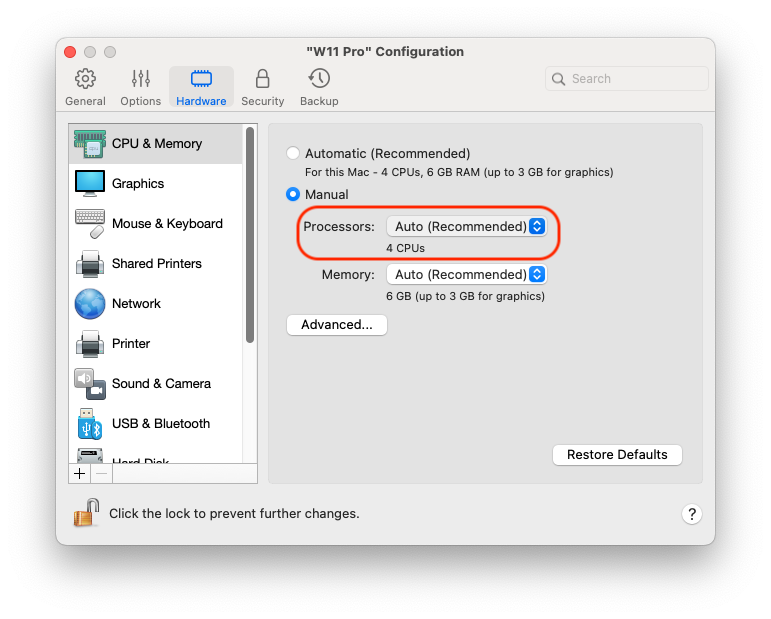
要设置向虚拟机分配的处理器数量,请执行以下操作:
1. [关闭虚拟机](/pdfm-20-ug-zh_cn/parallels-desktop-for-mac-20-yong-hu-zhi-nan/zai-mac-shang-shi-yong-windows/ru-men/guan-bi-huo-zhong-zhi-windows.md)。
2. 打开**操作**菜单并选定**配置**。
3. 单击**硬件 > CPU 和内存**,然后从**处理器**菜单中选择一个数字。
{% hint style="info" %}
\*\*注意:\*\*在 Parallels Desktop for Mac 中,您可以向虚拟机分配最多 4 个内核。在 Parallels Desktop for Mac Pro Edition 中,您可以分配最多 16 个内核。
{% endhint %}
---
# Agent Instructions
This documentation is published with GitBook. GitBook is the documentation platform designed so that both humans and AI agents can read, navigate, and reason over technical content effectively. Learn more at gitbook.com.
## Querying This Documentation
If you need additional information that is not directly available in this page, you can query the documentation dynamically by asking a question.
Perform an HTTP GET request on the current page URL with the `ask` query parameter, and the optional `goal` query parameter:
```
GET https://docs.parallels.cn/pdfm-20-ug-zh_cn/parallels-desktop-for-mac-20-yong-hu-zhi-nan/gao-ji-zhu-ti/shi-yong-xu-ni-ji/she-ding-fen-pei-ji-xu-ni-ji-de-chu-li-qi-shu-liang.md?ask=&goal=
```
`ask` is the immediate question: it should be specific, self-contained, and written in natural language.
`goal` is optional and describes the broader end goal you are ultimately trying to accomplish on behalf of the user. GitBook uses it to tailor the answer towards what is most useful for that goal.
The response will contain a direct answer to the question and relevant excerpts and sources from the documentation.
Use this mechanism when the answer is not explicitly present in the current page, you need clarification or additional context, or you want to retrieve related documentation sections.