> For the complete documentation index, see [llms.txt](https://docs.parallels.cn/llms.txt). Markdown versions of documentation pages are available by appending `.md` to page URLs; this page is available as [Markdown](https://docs.parallels.cn/pdfm-20-ug-zh_cn/parallels-desktop-for-mac-20-yong-hu-zhi-nan/an-zhuang-huo-sheng-ji-parallels-desktop/ji-huo-bing-zhu-ce-parallels-desktop.md).
# 激活并注册 Parallels Desktop
安装后,激活并注册 Parallels Desktop。请执行以下操作:
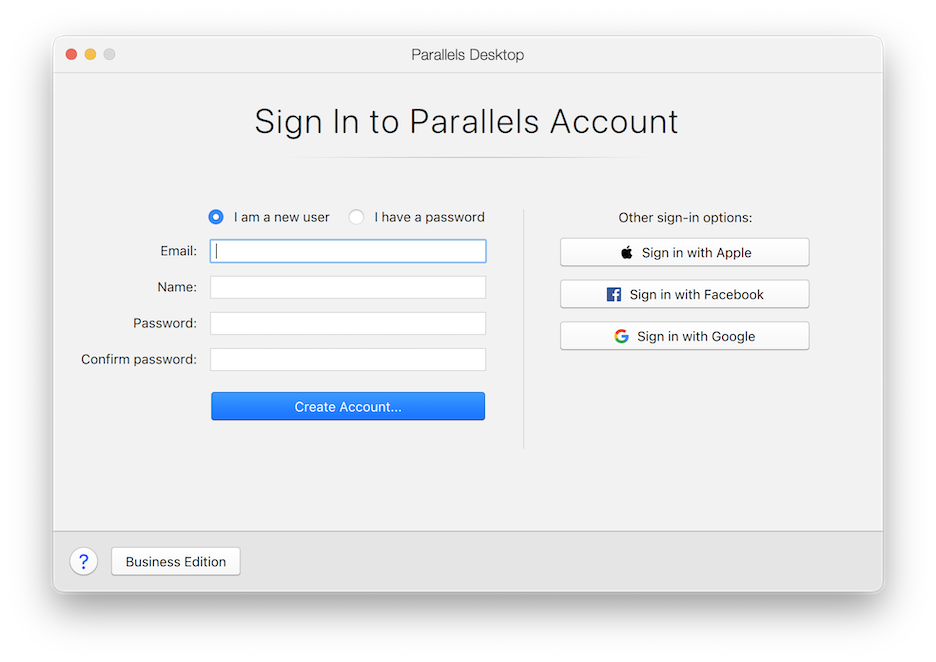
1. 登录 Parallels 账户:
Parallels Desktop Account Sign In Page
Parallels 账户可用于:
* 存储产品激活密钥,再也不会忘掉或丢失密钥了;
* 防止除您之外的其他任何人使用许可证密钥;
* 管理对 Parallels 产品的订阅;
* 联系 Parallels 技术支持团队,并跟踪支持请求解决进度;
* 下载最新版 Parallels 产品及随附文档;
* 获取产品最新更新和新产品的测试版;
* 通过 Web 浏览器使用远程计算机(作为 Parallels Desktop 用户,可以免费获取 Parallels Access);
* 在公司 Mac 上管理 Parallels Desktop 许可证(如果使用的是 Parallels Desktop for Mac Business Edition)。
要登录账户,请执行以下操作之一:
* 若有账户,选择\*\*“我有密码”**,输入电子邮件地址和密码,然后单击**“登录”\*\*。
* 若无 Parallels 账户,选择\*\*“我是新用户”**,输入用于创建账户的电子邮件地址、用户名、密码,然后单击**“创建账户”\*\*。
2. 在下一步中,输入用于激活 Parallels Desktop 的产品激活密钥。
{% hint style="info" %}
\*\*注意:\*\*如果您是从 Parallels Online Store 购买的 Parallels Desktop,密钥会发往您提供的邮箱地址。如果您购买的是盒装产品,则可以在安装光盘封套上找到您的密钥。
{% endhint %}
如果您具备了可用的许可证并已与您的帐户关联,则只需选择该许可证并单击**激活**即可。
### **如果您没有产品激活密钥**
如果您还没有密钥,则单击**免费试用 14 天**可获取免费的试用 Product Activation 密钥,以便您可以在限定的时间内试用 Parallels Desktop。您也可以单击**购买**,购买允许您永久使用 Parallels Desktop 的密钥。
---
# Agent Instructions
This documentation is published with GitBook. GitBook is the documentation platform designed so that both humans and AI agents can read, navigate, and reason over technical content effectively. Learn more at gitbook.com.
## Querying This Documentation
If you need additional information that is not directly available in this page, you can query the documentation by asking a question.
Perform an HTTP GET request on the following URL with the `ask` and `goal` query parameters:
```
GET https://docs.parallels.cn/pdfm-20-ug-zh_cn/parallels-desktop-for-mac-20-yong-hu-zhi-nan/an-zhuang-huo-sheng-ji-parallels-desktop/ji-huo-bing-zhu-ce-parallels-desktop.md?ask=&goal=
```
`ask` is the immediate question: it should be specific, self-contained, and written in natural language.
`goal` is what the user is ultimately trying to achieve, the reason they need the answer. Sharing it helps GitBook give you a better, more relevant answer. A goal is most helpful when it describes the outcome the user wants rather than restating the question. For example, with `ask=how do I create an API token`, a goal like `automate deployments from our CI pipeline` lets GitBook tailor the answer to that use case.
The response will contain a direct answer to the question and relevant excerpts and sources from the documentation.
Use this mechanism when the answer is not explicitly present in the current page, you need clarification or additional context, or you want to retrieve related documentation sections.